Today we’re releasing a minor Butler update (to version 4.1.7), which includes support for Sparkle (to automate future updates), and fixes some issues with non-standard iTunes library locations, visual glitches when dragging, and incorrectly-placed System Preferences panels.
Butler should (if you’ve enabled checking for updates) indicate that this update is available, and take you to the web page to download it. If it doesn’t, just click the Download link on the Butler web page to get it. Note that Butler now requires 10.5 or newer; if you’re still running 10.4, you’ll want to skip this update. (The older version is still downloadable from our web site, in case you accidentally upgraded).
The other news in this update is some preparation for Butler 5’s release. Butler now displays the standard Many Tricks’ software license, though it doesn’t actually do any license checking—so Butler is still unlimited shareware. There are no nag screens, nothing expires, and no features are restricted to paying customers. (And we’ll always offer a version of Butler 4 for download from our site.)
Butler 5, however, will be true shareware, much like our other major apps. Given we’re still working on features, interface, etc., we’re not sure what the restrictions will be, nor have we settled on a price for Butler 5. However, we’d like to reward those who have bought Butler 4 in the past, and those who may buy it before Butler 5 is released. To do that, we’re announcing the Butler 5 pre-sale:
If you purchase Butler 4 ($20) between now and Butler 5’s release date, you’ll receive a free upgrade to Butler 5 when it ships. In addition, as explained in this older blog post, all past donors (assuming you have proof of donation) will also receive free Butler 5 licenses. This is our way of offering some price protection against an unknown price, and rewarding both those who purchased Butler in the past and those who purchase it going forward, knowing Butler 5 is coming.
So if you’ve been holding off on contributing for Butler 4, now’s the time to do so—it’s like buying Butler 4 and an upgrade to Butler 5, but for the price of Butler 4 alone.
 Many Tricks

 The default gradient is seen in the image at right, but you have (as you might expect from Many Tricks) full control over its appearance—including whether it’s there at all.
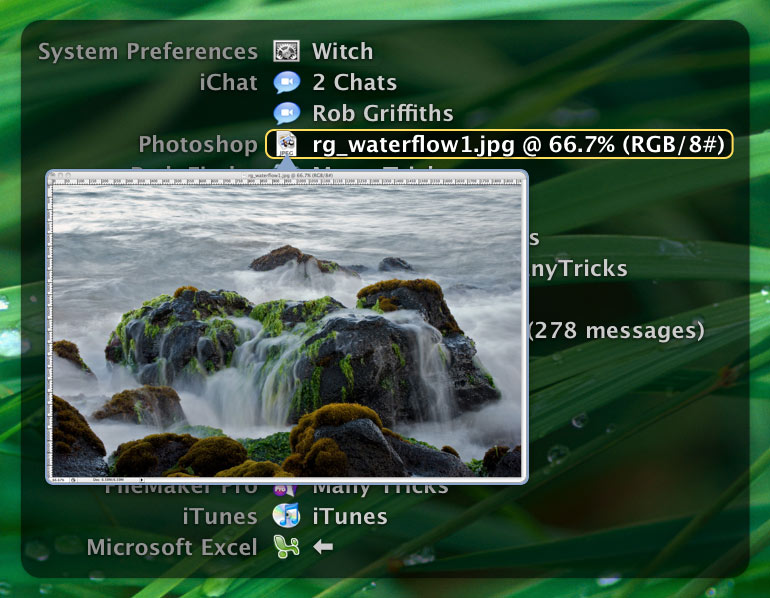 So what’s new and different in Witch 3.5? The most visible change in this release—and the one that had the largest impact on the version number jump—is that Witch now provides window previews for all windows it knows about.